
How AI Overviews are changing Google SEO
October 12, 2026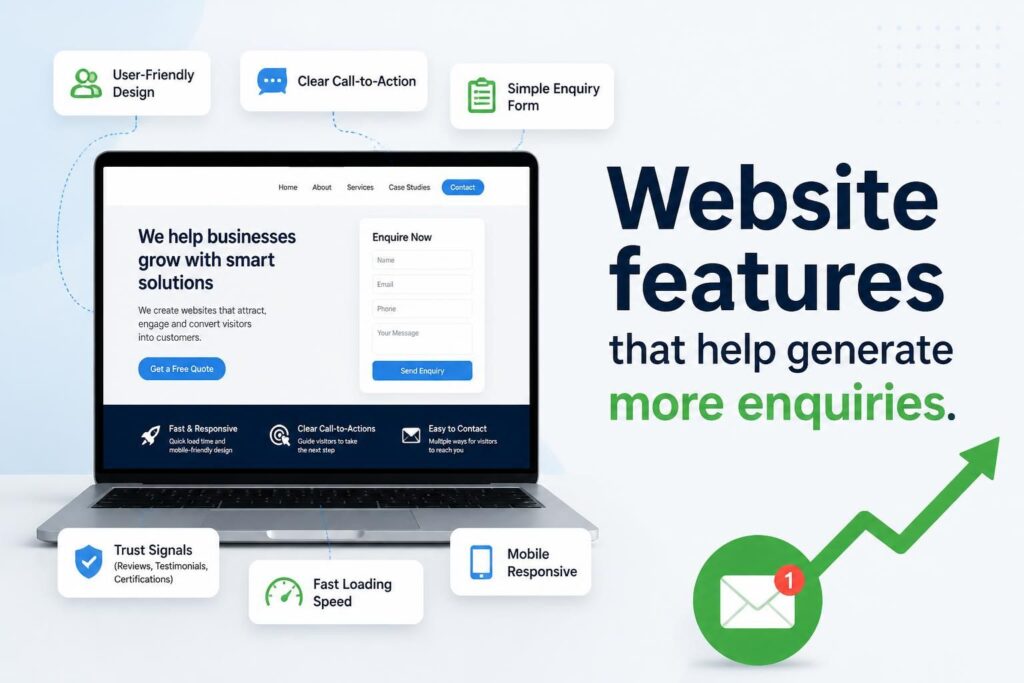





A website generates more enquiries when it removes doubt, makes the next step obvious and gives visitors a simple way to contact the business. Attractive design helps, but enquiry growth usually depends on practical features such as focused service pages, visible contact options, proof of credibility, fast performance and forms that are easy to complete.
Business owners should judge each website feature by a straightforward test: does it help the right visitor understand the offer, trust the business or take action? If a feature does none of these things, it may be adding clutter rather than supporting lead generation. The strongest business websites connect useful content with a clear conversion path.
Siteweb services that support lead generation
A website rarely generates enquiries in isolation. It also needs qualified traffic from channels used by prospective customers. Siteweb Online Marketing can help businesses strengthen visibility and attract people who are actively researching relevant products or services.
- Google Business Profile optimisation can improve the accuracy and usefulness of a business’s local search presence.
- Google Ads management can place a business in front of people searching for specific services.
- Search engine optimisation helps relevant website pages become more visible in organic search results.
- Generative engine optimisation focuses on making business information clear, useful and accessible to AI-assisted search platforms.
- Social media marketing can build awareness and bring interested audiences to focused website pages.
Start with a clear value proposition
A visitor should be able to identify what the business offers, who it serves and why the offer may be relevant within a few moments of opening a page. If people must interpret vague slogans or search through several sections to understand the service, many will leave before reaching a contact form.
The opening section of an important landing page should normally contain a descriptive headline, a short explanation of the offer and a visible action. That action might be requesting a quotation, arranging a consultation, checking availability or calling the business. The wording should reflect what will happen next rather than relying on a generic button such as “Submit”.
For example, “Commercial cleaning for offices in Pretoria” communicates more than “A cleaner future starts here”. A supporting sentence can then explain the type of premises served, the main service distinction and the next step. Creative brand language can still be used elsewhere, but clarity should come first where a visitor is deciding whether to continue.
Build dedicated pages around customer needs
A single services page containing a short paragraph about every offering rarely answers the questions needed to generate a serious enquiry. Dedicated service pages allow a business to explain the problem addressed, the work involved, who the service suits, expected next steps and factors that affect the quotation.
These pages also create better destinations for search, advertising, email and social media campaigns. A visitor searching for a specific service should arrive on a page about that service, not a general home page that forces another round of navigation.
A useful service page may cover:
- The customer problem or requirement addressed by the service
- What is included and what falls outside the standard scope
- The types of customers, properties or industries served
- The process from initial enquiry to delivery
- Information required to prepare an accurate quotation
- Common questions, limitations and realistic expectations
- A relevant call to action positioned near the decision point
Businesses serving different customer groups may need separate pages where the requirements differ materially. Residential and commercial customers, for instance, often ask different questions and evaluate suppliers according to different criteria. Separate pages are useful when they provide distinct information; duplicating the same page and changing only a location or industry name provides little value.
Use calls to action that match the visitor’s readiness
Not every visitor is ready to request a quote immediately. Some are comparing options, checking whether a service fits their situation or trying to understand likely costs. A website can accommodate these stages without presenting a confusing collection of buttons.
Pages with strong purchase intent should have one primary action and, where useful, one lower-commitment alternative. A primary action could be “Request an assessment”, while a secondary option might be “Ask a question” or “View the service process”. The visual hierarchy should make the preferred next step clear.
Calls to action work best when their context answers three concerns:
- What will happen? Explain whether the visitor will receive a call, quotation, assessment or written response.
- What information is needed? Indicate whether measurements, photographs, location details or a brief description will help.
- What is the commitment? Avoid implying an obligation if the first step is only a discussion or estimate.
Place calls to action where a visitor may reasonably be ready to act: near the opening value proposition, after a service explanation, alongside evidence and at the end of the page. Repeating one relevant action is different from interrupting every paragraph with a sales prompt.
Make contact options easy to find and use
Contact details should not be hidden in a footer or confined to a contact page. On mobile devices, tap-to-call and messaging options can reduce effort. On desktop, a short enquiry form may be more convenient for someone who needs to provide context.
The right contact options depend on how the business handles leads. A company should not promote a channel that is seldom monitored. Missed calls, unanswered messages and forms routed to an inactive mailbox waste the demand the website has created.
Keep enquiry forms focused
Every additional field gives the visitor another reason to postpone or abandon an enquiry. Ask only for information needed to qualify the request or provide a useful response. Name, contact details, service required and a short message are often enough for an initial conversation. More detailed fields may be justified where location, quantity, budget range or a reference number materially affects the response.
Good forms also need clear labels, useful validation messages, a visible privacy explanation and a confirmation after submission. The confirmation should tell the person whether the enquiry was received and what to expect next. Test the form regularly on mobile and desktop devices, including the notification sent to the business.
Provide alternatives for people who cannot use the form
Some visitors prefer email, telephone or WhatsApp, while others may be browsing in an environment where a call is inconvenient. Offering two or three well-managed options can increase accessibility without creating clutter. Business hours should be shown where response availability is limited.
Show evidence that reduces buying risk
Prospective customers are more likely to enquire when they can see credible evidence that the business understands the work. Useful proof is specific, verifiable and connected to the service being considered. Unsupported statements such as “best service” or “industry leader” do not explain what a customer can expect.
Depending on the business, credible website evidence may include:
- Detailed case studies describing the challenge, approach and outcome
- Customer reviews or testimonials used with permission
- Photographs of completed work that accurately represent the business’s projects
- Recognised memberships, licences or certifications where current and relevant
- Named team members with genuine roles and areas of responsibility
- Clear service areas, trading details and contact information
- Policies, warranties or guarantees stated accurately and with applicable conditions
Case studies are particularly useful for complex or higher-value services. They help a prospective customer recognise a situation similar to their own. Avoid vague success stories that omit the type of work completed. If customer confidentiality applies, describe the problem and process without publishing identifying information.
Answer the questions that delay an enquiry
Visitors often leave because the page does not address a practical concern. They may want to know whether the business works in their area, handles their type of project, offers an appropriate option or needs specific information before quoting.
Talk to sales staff, receptionists and technicians to identify questions that arise before a customer books. Search queries and website analytics can provide further clues. The answers can then be incorporated into service pages, pricing explanations, comparison content or a focused FAQ section.
Pricing deserves careful treatment. Publishing an exact figure is not always practical, but silence can create uncertainty. Where fixed prices are impossible, explain the factors that influence cost, such as scope, materials, quantity, location, urgency, access or specialist requirements. This helps visitors prepare a more useful enquiry without forcing the business to make an inaccurate promise.
Improve mobile speed and usability
A lead-generation page must work on the device the customer is actually using. On a small screen, oversized banners, intrusive pop-ups, tiny text and closely spaced buttons can block the enquiry path. Slow pages also create friction before visitors have seen the offer.
Useful performance improvements include correctly sizing images, removing unnecessary scripts, limiting heavy animation, using efficient hosting and loading only the assets required by the page. Performance should be tested on realistic mobile connections rather than judged only on a fast office network.
Usability checks should cover more than speed. Confirm that menus open correctly, buttons are easy to tap, telephone numbers initiate calls, form fields use appropriate input types and error messages remain visible. Google’s PageSpeed Insights can identify technical performance opportunities, although test scores should be interpreted alongside real user experience and business results.
Use navigation and internal links to guide decisions
Website navigation should reflect the way customers look for information. Broad labels such as “Solutions” may work when their meaning is obvious, but descriptive service names are usually easier to interpret. Important pages should not be buried several clicks below the home page.
Internal links help visitors move from educational information to relevant commercial pages. A blog article about improving local visibility, for example, can link to a suitable local marketing service. A service page can link to a case study, process explanation or contact page. Anchor text should describe the destination instead of repeatedly using “click here”.
Breadcrumbs can also help visitors understand where they are on a large website. They are not a replacement for clear navigation, but they make movement between categories and pages easier.
Add booking, quotation and chat tools only when they fit the process
Interactive tools can shorten the journey from interest to enquiry, but only when they match the way the business operates. An online booking calendar is useful if appointments follow defined time slots. It may be unsuitable where staff must first assess scope, travel time or technical requirements.
Quotation calculators can help visitors understand likely cost ranges, provided the variables are reliable and the limitations are explained. A misleading instant price can attract unsuitable leads or create conflict when the final scope differs.
Live chat and automated chat tools need similar care. They should answer defined questions, make it easy to reach a person and never pretend that an automated response is a confirmed quotation or professional assessment. If no one can monitor live conversations, a clearly labelled message form may set better expectations.
Track the enquiries that matter
More form submissions do not automatically mean better lead generation. A website may attract spam, job applications, supplier messages or requests outside the service area. Measurement should distinguish meaningful sales enquiries from other contacts.
A practical tracking setup can record:
- Successful form submissions
- Clicks on telephone numbers, email addresses and messaging links
- Completed bookings or quotation requests
- The landing page and marketing source associated with an enquiry
- Qualified leads, proposals and completed sales where the sales process allows this
Thank-you pages or confirmed form events can provide more reliable measurement than tracking clicks on a submit button. Call tracking may help businesses that receive many telephone enquiries, but numbers must be implemented carefully so that the main business details remain consistent and accessible.
Analytics should be used to make decisions, not simply to produce reports. If a page receives relevant traffic but few enquiries, review the offer, evidence, form and mobile experience. If it produces many unsuitable enquiries, the targeting or page content may be too broad.
Protect customer information and prevent form abuse
Enquiry forms collect personal information, so businesses should request only what they need and handle it responsibly. South African organisations should assess their obligations under the Protection of Personal Information Act and provide an appropriate privacy notice. The Information Regulator South Africa publishes official information about POPIA.
Website security measures should include HTTPS, controlled administrator access, software updates, backups and spam protection. CAPTCHA or other anti-spam controls can help, but they should not make the form unnecessarily difficult for genuine users. Sensitive documents or financial information should not be requested through an ordinary form unless the system is designed to protect that data.
A practical enquiry-generation review
Review the website as if you were a first-time customer with a specific problem. Avoid relying only on the opinions of people who already understand the business. The following process provides a useful starting point:
- Choose the most valuable service. Identify the customer group and the main reason that person would visit the page.
- Check the first screen. Confirm that the service, audience and next step are clear without scrolling extensively.
- Follow the customer journey. Move from the landing page through supporting information to the enquiry action.
- Test every contact method. Submit forms, click telephone links and confirm that notifications reach the correct person.
- Review the evidence. Check that testimonials, project examples and business details are accurate, relevant and current.
- Test on several screen sizes. Pay close attention to forms, menus, pop-ups and button spacing.
- Inspect lead quality. Compare website enquiries with the customers the business actually wants to attract.
- Improve one bottleneck at a time. Prioritise changes that remove uncertainty or effort, then measure the result.
This review should include sales and customer-facing employees where possible. They often know which concerns appear repeatedly and which details distinguish a qualified lead from a poor fit.
Common website changes that do not solve the real problem
A complete redesign is not always the first answer. If visitors cannot understand the service, replacing colours and images while keeping the same vague content will not improve the decision process. Likewise, increasing advertising spend will not compensate for a broken form or an offer that lacks credibility.
Common mistakes include adding several competing pop-ups, using stock images as the only proof of capability, asking for too much information, hiding service details behind a mandatory consultation and placing identical calls to action on pages with different purposes. Another frequent problem is optimising for traffic volume while ignoring whether visitors match the business’s service area, budget level or customer profile.
Start with the highest-impact obstacle. For some websites, that is a weak service page. For others, it is poor mobile performance, limited proof or no reliable way to measure leads. The correct priority comes from combining customer feedback, analytics and direct testing.
Questions business owners ask about enquiry-generating websites
What is the most important feature on a lead-generation website?
No single feature works independently, but a clear offer paired with an easy, relevant contact action is the foundation. Visitors need to know what the business does, whether the service fits their needs and what will happen after they make contact.
How many fields should an enquiry form contain?
Use the fewest fields required to respond usefully or qualify the request. A simple service enquiry may need only a name, contact method and message. Complex quotations may justify extra details, but each field should have a clear operational purpose.
Should prices be displayed on a business website?
Display fixed prices when they are accurate and helpful. For customised work, explain the factors that affect price or provide a realistic starting point or range only if the business can support it. Never publish an artificial figure merely to attract clicks.
How quickly should a business respond to a website enquiry?
The website should state a response expectation the business can consistently meet. Faster responses can help while the customer’s need is current, but accuracy and reliable follow-up matter more than publishing an unrealistic promise.
How can a business tell whether its website is generating quality leads?
Track more than form totals. Record the source, service requested, location, qualification status and eventual outcome where practical. This shows which pages and marketing channels produce genuine opportunities rather than spam or irrelevant messages.
Turn the website into a measurable sales asset
Website features that help generate more enquiries are usually the ones that make buying easier: precise service information, visible proof, straightforward navigation, useful contact options and dependable performance. The right combination depends on the business, the value of the sale and the questions customers ask before making contact.
Siteweb Online Marketing can review how your website, search visibility and paid or social campaigns work together to attract and convert prospective customers. If your current website receives traffic but does not produce enough suitable enquiries, contact Siteweb to discuss your lead-generation priorities and the obstacles affecting your conversion path.