Best landing page design for Google Ads
November 16, 2026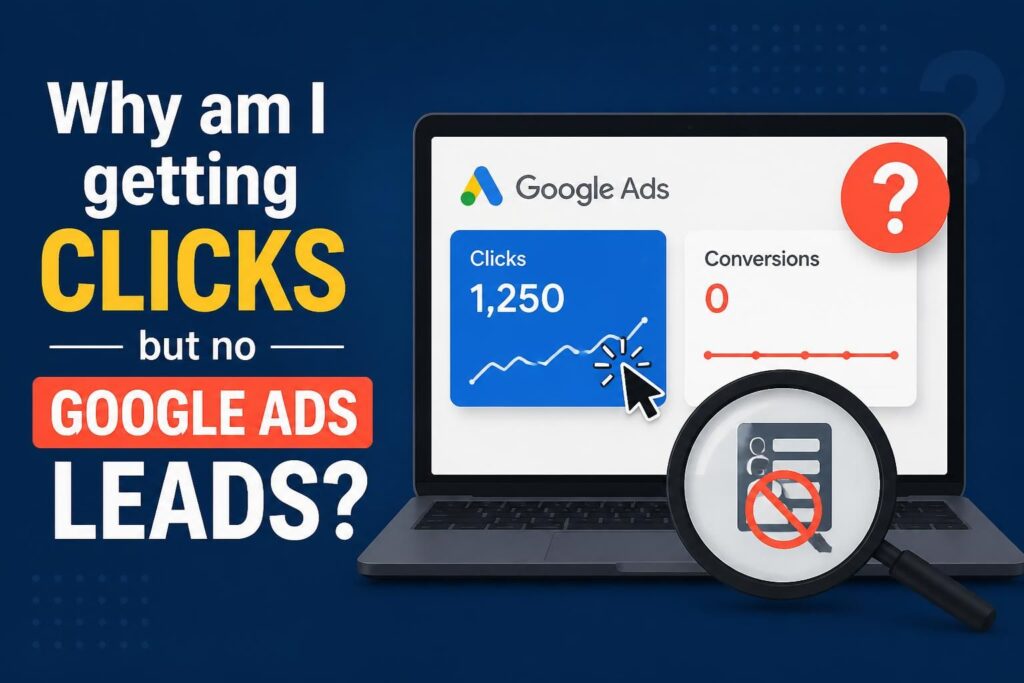




Clicks without enquiries usually mean one of two things: Google Ads is attracting the wrong visitors, or the path from ad click to completed enquiry is breaking down. The problem may sit in conversion tracking, search terms, location targeting, the offer, the landing page, the form or the way leads are handled after submission.
Do not judge the campaign by click-through rate alone. Start by confirming whether genuine leads occurred but were not recorded, then inspect the exact searches and audience segments producing clicks. This separates a measurement problem from a traffic or conversion problem before more budget is spent.
Other Siteweb services that support online lead generation
Paid search performs best when advertising, organic visibility, local presence and supporting channels work together. Siteweb Online Marketing provides:
- Google Business Profile optimisation for stronger local visibility and accurate business information.
- Google Ads campaign management focused on relevant traffic, conversion measurement and lead generation.
- Search engine optimisation that helps businesses earn organic visibility for commercially relevant searches.
- Generative engine optimisation for clearer brand visibility across AI-assisted search experiences.
- Social media marketing that supports brand awareness and customer engagement.
First establish whether you have no leads or no recorded conversions
A Google Ads account can report zero conversions even when people have called, emailed or completed a form. Before changing keywords or bids, compare advertising data with the systems that record real customer activity.
Check your email inbox, spam folder, website form database, call records, customer relationship management system and online booking platform. Match the dates and approximate times of genuine enquiries against campaign activity. If enquiries exist outside Google Ads, the immediate problem is measurement rather than demand.
Run a controlled test on every lead route. Submit the form from an ad landing page, click the phone number on a mobile device and complete any booking or quotation process. Confirm that the business receives the enquiry and that the intended conversion appears in Google Ads after normal processing time.
Common conversion tracking faults
- The Google tag or Google Tag Manager container is missing from the landing page.
- The conversion event fires when somebody views the form instead of after a successful submission.
- A thank-you page is no longer reached because the form or website was redesigned.
- A GA4 event was created but not imported into Google Ads, or it is not being used as a primary conversion action.
- The campaign is optimising towards page views, button clicks or other micro-conversions rather than qualified enquiries.
- A telephone link click is counted as a lead even though the visitor never completed a call.
- Tracking is duplicated, causing one enquiry to be recorded more than once.
- Cookie consent settings, browser restrictions or cross-domain journeys interfere with measurement.
Review the status, source, counting method and optimisation setting of every conversion action. A lead-generation campaign normally needs a clearly defined primary action, such as a submitted quotation request, completed booking or sufficiently valuable telephone call. Secondary actions can still be observed without allowing weak signals to drive bidding decisions.
Your ads may be buying curiosity rather than buying intent
A click only proves that the ad persuaded someone to visit. It does not prove that the visitor needs the service, can buy it, is located in the service area or understood what the business offers.
Broad or ambiguous keywords can attract searches that look relevant at first glance but have a different purpose. A company bidding on “business website” might receive visits from people looking for templates, jobs, courses, examples, free tools or login pages. Those users may click a well-written ad without any intention of hiring a service provider.
Inspect search terms rather than relying on keyword names
Keywords are the targeting instructions supplied to Google Ads. Search terms are the words people actually entered before seeing or clicking an ad. The search terms report is therefore one of the most useful places to investigate wasted spend.
Classify meaningful search terms into practical groups:
- High intent: searches that describe the service, buying need and relevant location.
- Research intent: searches seeking ideas, definitions, examples or general advice.
- DIY intent: searches for instructions, templates, software or free solutions.
- Employment or training intent: searches involving jobs, salaries, courses or qualifications.
- Wrong service: searches that share terminology with the offer but refer to a different product or industry.
- Wrong location: searches from areas the business cannot serve economically.
Add carefully chosen negative keywords for clearly irrelevant themes, but review them before applying them across the entire account. An overly aggressive negative list can block valuable searches as easily as a loose campaign can admit poor ones.
Match types and campaign structure affect lead quality
Keyword match types control how closely a query needs to relate to a keyword, but they should not be treated as simple switches for “good” or “bad” traffic. Broader matching can discover useful demand when conversion data and bidding signals are reliable. It can also spend quickly on weak traffic when tracking is incomplete or the offer is difficult for Google to interpret.
Separate services with materially different intent, value or landing pages. For example, Google Business Profile optimisation and technical SEO may both sit under digital marketing, but their buyers have different problems. Combining them in one loosely organised ad group makes it harder to write precise ads, choose the right landing page and evaluate which service is producing opportunities.
Brand searches should also be evaluated separately from non-brand acquisition. Someone searching for the company by name is already familiar with it and will usually behave differently from a person comparing providers for the first time. Blending the two can make account-level results look healthier than new-customer acquisition really is.
Location settings can send clicks from outside your market
South African businesses should check both the locations selected and the advanced location options used by each campaign. Depending on the campaign settings, ads may reach people physically present in an area or people who have shown interest in that area.
Interest-based reach can be useful for accommodation, travel, relocation and other services bought before arrival. A plumber, dentist or local contractor will usually care more about the searcher’s current location and whether the address falls inside the service area. Review performance by user location and exclude regions that repeatedly spend without producing viable enquiries.
Do not target all of South Africa simply because the platform permits it. Delivery capacity, travel time, language, shipping costs and sales coverage should determine the practical market. If different provinces or cities have different commercial value, separate reporting or campaigns can make that visible.
The promise in the ad must match the landing page
A visitor should be able to confirm within seconds that the page provides the service described in the ad. If an ad promotes Google Ads management but opens on a general homepage covering five unrelated services, the visitor must work harder to find the relevant information.
Strong message matching means the keyword, advertisement and landing page tell the same story. The page should explain the service, who it is for, the problem it solves, the next step and any important eligibility or service-area conditions. It should not repeat the ad mechanically, but it should fulfil the expectation created by the click.
Landing-page checks that reveal conversion friction
- Does the main heading identify the service clearly?
- Is the primary action visible on a mobile screen without hunting through the page?
- Does the page explain what happens after the form is submitted?
- Are telephone numbers and buttons functional on mobile devices?
- Is the text readable without zooming?
- Are forms asking only for information needed at this stage?
- Does the page include real business details and credible evidence rather than vague claims?
- Are errors displayed clearly when a form field is incomplete?
- Does the page load reliably on ordinary mobile connections?
For South African customers, practical reassurance may include a local contact number, clear service areas, relevant payment or consultation information and prices in rand where publishing prices makes commercial sense. These details should be accurate and should not be added merely for appearance.
Your offer may not give visitors a reason to enquire
Relevant traffic can still fail to convert when the next step is vague or disproportionately demanding. “Contact us” gives less context than “Request an account review” or “Ask for a quotation”, provided the business genuinely offers that next step.
Consider the commitment expected from a first-time visitor. A lengthy form requesting turnover, budgets, identity details and several open-ended answers may be appropriate later in a sales process, but it can discourage an early enquiry. On the other hand, a form that requests only a name may generate contacts the sales team cannot qualify.
A practical lead form usually asks for enough information to respond properly without turning the initial enquiry into an application. The right balance depends on the service value, buying cycle and risk of irrelevant submissions.
Mobile usability problems often hide behind healthy click numbers
Google Ads can deliver clicks to a page that technically opens but is difficult to use. Test the full journey on several real mobile devices rather than relying only on a desktop preview.
Look for buttons covered by cookie banners, forms that reset after an error, menus that occupy most of the screen, telephone links that do not open the dialler and fields that use the wrong mobile keyboard. Check whether a form can be submitted on both Wi-Fi and a mobile connection. A page that appears acceptable in the office may perform poorly under everyday conditions.
Segment campaign performance by device. If mobile traffic accounts for substantial spend but no verified enquiries, investigate the mobile experience before simply reducing bids or excluding devices. The problem may be the page rather than the audience.
Clicks may be too few to support a reliable conclusion
A handful of clicks with no leads does not automatically indicate failure. Lead generation is variable, and expensive or considered services may require more interactions before a clear pattern appears. Avoid using a universal conversion-rate benchmark to decide how many clicks “should” have produced a lead.
Estimate the number of visits needed from your own economics. If the target is ten leads and the site historically converts one in twenty relevant paid-search visits, approximately 200 suitable visits would be needed to plan around that rate. This is a planning estimate, not a guarantee, and it is meaningful only if conversion tracking and traffic quality are sound.
Judge the campaign at the most specific level supported by enough data. An account may appear unproductive while one service, search theme, location or device is performing well and another is consuming most of the budget.
Campaign settings may favour volume over qualified enquiries
Automated bidding follows the conversion signals it receives. If the account labels every button click, short call or brochure download as a primary conversion, the system may find more people likely to complete those easy actions rather than people likely to become customers.
Review campaign goals and make sure valuable lead actions are used for optimisation. Where sufficient data and suitable systems are available, feed later outcomes back into advertising. A submitted form is useful, but a qualified opportunity, booked consultation or completed sale gives a clearer picture of business value.
This is particularly relevant when spam, job applications, supplier pitches and out-of-area enquiries inflate the lead count. Optimising only for form volume can reward the wrong behaviour.
The follow-up process can turn advertising leads into apparent failures
Sometimes the campaign creates valid enquiries but the business does not contact them quickly enough, cannot identify their source or records them inconsistently. Calls may go unanswered, quotation requests may remain in a shared inbox, and form notifications may be blocked as spam.
Agree on a simple lead-handling process before increasing campaign spend:
- Route each enquiry to a named person or monitored team inbox.
- Record the source, service, location and date in a consistent system.
- Define what counts as a valid, qualified and won lead.
- Set an internal response target appropriate to the type of enquiry.
- Record reasons for disqualification, such as wrong location, insufficient budget or an unavailable service.
- Review these reasons with the person managing Google Ads.
Sales feedback helps distinguish marketing problems from operational ones. If many enquiries request a service the business does not provide, targeting and ad copy need attention. If good prospects are not being contacted, campaign changes will not solve the underlying issue.
A practical order for diagnosing clicks with no leads
Changing several settings at once makes it difficult to identify what worked. Use this sequence instead:
- Verify real enquiries: compare Google Ads with forms, calls, email and customer records.
- Test tracking: complete every conversion route and inspect the conversion-action configuration.
- Review search terms: identify irrelevant intent and build a controlled negative-keyword list.
- Check locations and networks: find where clicks are actually coming from rather than relying on the campaign’s target label.
- Segment performance: compare service themes, devices, times, locations and brand versus non-brand traffic.
- Test the landing page: confirm message match, mobile usability, form delivery and page speed.
- Assess the offer: make the next step specific, credible and proportionate to the visitor’s level of commitment.
- Connect lead quality: record which enquiries become qualified opportunities and customers.
Document the date and reason for each meaningful change. Allow enough time and traffic to evaluate it, unless the issue is clearly harmful, such as broken tracking, an unusable form or targeting in the wrong country.
Metrics that provide more insight than click volume
Clicks and click-through rate help explain whether ads attract attention. They do not measure sales value. A useful lead-generation review should connect advertising behaviour to business outcomes.
- Search-term relevance: whether clicked searches describe problems the business can solve.
- Verified conversion rate: the share of eligible ad interactions producing correctly tracked lead actions.
- Cost per qualified lead: advertising cost divided by enquiries that meet the business’s qualification rules.
- Lead-to-sale rate: the share of qualified leads that become customers.
- Cost per acquired customer: total advertising cost relative to completed customer acquisitions.
- Lead value by campaign: the revenue or assessed value linked to different services and search themes.
A campaign with fewer leads can be more profitable if those leads are relevant and commercially valuable. Conversely, a low reported cost per conversion means little when the conversions are accidental clicks or poor-quality submissions.
When professional Google Ads assistance is worthwhile
Professional help is useful when conversion tracking cannot be verified, the account contains several overlapping campaigns, lead quality is unknown or budget is being spent without a clear link to sales. An effective review should examine the complete route from search term to customer outcome, not just change bids and ad wording.
Siteweb Online Marketing can review campaign targeting, conversion actions, landing-page alignment and lead-quality feedback to identify where the enquiry path is failing. If your campaigns are receiving clicks without producing measurable business opportunities, contact Siteweb Online Marketing to discuss a structured Google Ads review.
Questions business owners ask about clicks and conversions
Why do I have a good click-through rate but no leads?
A good click-through rate means the ad is persuasive or relevant enough to earn clicks. It does not confirm buying intent. Check search terms, locations, landing-page relevance, form usability and conversion tracking before treating the click-through rate as proof that the campaign is working.
Can Google Ads record zero conversions even when I received enquiries?
Yes. Leads can be missed when tags are absent, events fire incorrectly, forms do not reach the expected confirmation page or conversion actions are not imported and configured correctly. Compare Google Ads with your inbox, call records, form database and CRM.
Should I pause keywords that receive clicks but no leads?
Not automatically. First inspect the search terms triggered by the keyword and consider the amount of data available. A relevant keyword may appear ineffective because tracking is broken, the landing page is weak or too few clicks have occurred. Pause or restrict it when the underlying traffic is consistently irrelevant or uneconomical.
How many clicks should produce one lead?
There is no reliable universal number. Conversion rates vary by industry, offer, location, device, price, competition and landing-page quality. Use verified historical performance and business economics rather than a generic benchmark.
Do more clicks eventually solve the problem?
More suitable traffic can generate more opportunities, but buying additional irrelevant clicks usually increases waste. Fix tracking, intent, targeting and conversion friction before scaling the budget.
Official resources
- Google Ads Help: set up website conversion tracking
- Google Ads Help: understand the search terms report
- Google Ads Help: keyword matching options